An app for organizing coursework, entirely on the phone
My School is a mobile academic organization app for students: you enter your subjects, what each one requires you to submit, and the tasks that make up each submission, and the app shows what is due and when. Its structure is a three-level hierarchy—Course → Activity (with an optional grouping Project) → Task—plus a calendar view that gathers everything with a date.
It is built with Expo 54 and Expo Router 6 on React Native 0.81 and React 19, in TypeScript 5.9, with
Zustand for state and a custom theming system supporting light/dark modes and Spanish/English i18n. It also
runs in the browser through react-native-web, which is where the screenshots on this page come from.
It works entirely locally: there is no backend, no accounts, and no synchronization between devices. That defines the scope, rather than promising unfinished work—everything the app saves lives on the phone.
It is entirely my own project: 32 commits, all mine, with no fork or upstream to credit, over a 13-day window (2026-04-22 to 2026-05-05).
26 HTML wireframes before writing a line of React Native
This is the part that defines the project most clearly, and it can be verified without taking my word for
it: it is visible in the commit order. The repository’s first six commits contain no React Native code.
They are the design/ folder: 26 hand-written HTML wireframes (design/views/*.html with
design/css/wireframe.css), one for every app screen. Only then does
chore: initialize Expo 54 project setup (Phase 0) appear.
From there onward, the work is split into numbered phases, each implementing part of what was already drawn:
| Phase | What it adds |
|---|---|
| Phase 0 | Expo 54 project setup |
| Phase 1 | Tokens and theming system |
| Phase 2 | Data layer |
| Phase 3 | Navigation |
| Phase 4 | Courses (Course) |
| Phases 5–7 | Tasks, Activities, and Projects |
| Phase 8 | Calendar |
| Phase 9 | Search |
| Phase 10 | Settings |
| Phase 11 | Polish |
After Phase 11 come fixes and polish, with internationalization added at the end in its own dedicated commit.
What this order buys is concrete: Phase 1 can begin with design tokens because all 26 screens already existed in HTML and the necessary colors, typography, and spacing were known. Phase 3 can build navigation because the screen map was already complete rather than still being discovered. And Phases 4 through 7 are vertical product slices—one complete entity at a time—instead of “build every screen halfway and return.”
The cost is real too: designing 26 screens before programming is six commits of work that produce no app, and it commits UI decisions before touching a device. It worked here because the scope was bounded and the user was known; it is not a recipe that can be transferred unchanged to a product with moving requirements.
Three levels, plus an optional fourth that groups them
The model makes the app useful for real coursework rather than a task list with a nice name. It is
documented in docs/architecture.md and declared in src/types/entities.ts:
Course
└── Project (optional — groups related activities)
    └── Activity
        └── Task
└── Activity (standalone, without a project)
    └── Task
└── Task (standalone, without an activity)
The key lies in “optional” and “standalone”: no intermediate level is mandatory. A task can hang directly from a course without inventing a container activity, and an activity can exist without a project. A rigid model with four mandatory levels forces you to create empty entities just to reach the level where you want to write something—which is exactly when somebody stops using the app.
That flexibility requires deletion rules unlike those of a normal tree, and they are explicit:
Deleting a course cascades
Course is the only level that takes everything below it along: when the course goes, so do its projects, activities, and tasks.
Deleting a project or activity does NOT delete its children
Children remain standalone beneath Course, the one level that always exists. Reorganizing must not cost you data.
Progress is calculated, not entered
A Project's progress is completed tasks over total tasks—a derived number, with no field that can become stale.
Only items with dueDate reach the calendar
Without a due date, an item exists in its course but takes no space in the calendar.
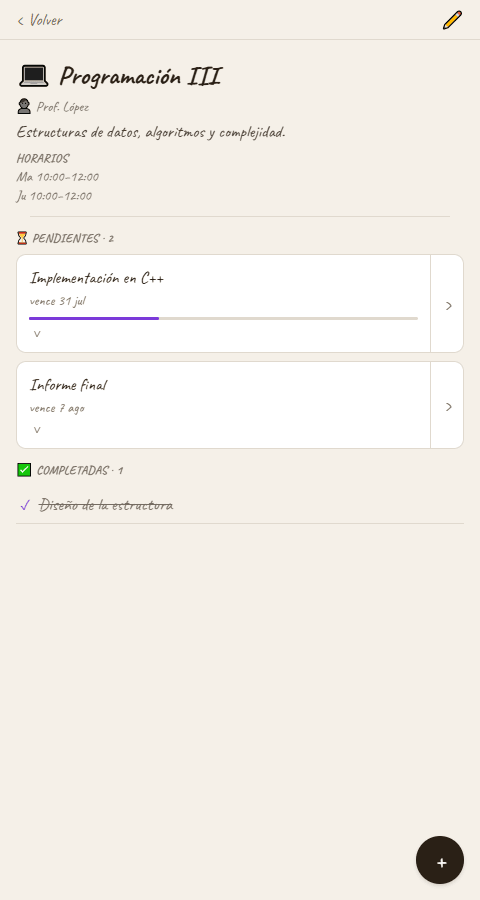
Courses, activities, and calendar, working
The screenshots come from the real app running in a browser with test data generated by its own Settings button. These are the three main views, one per tab.
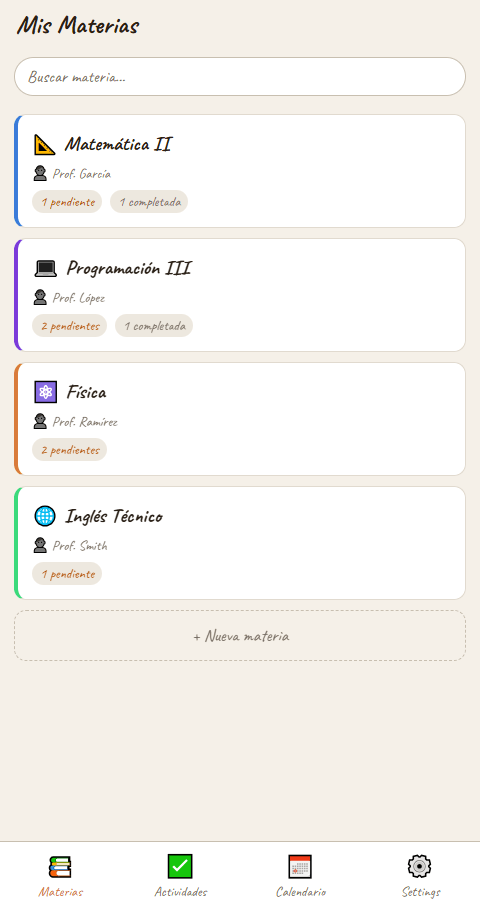
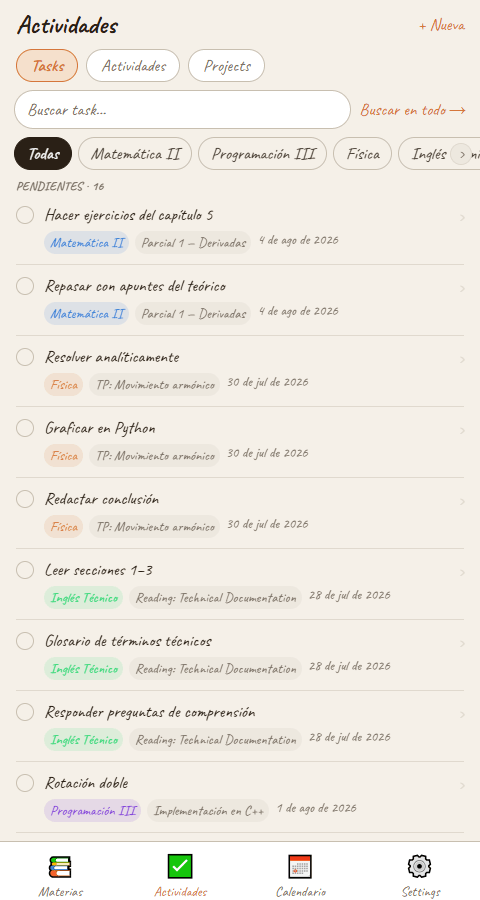
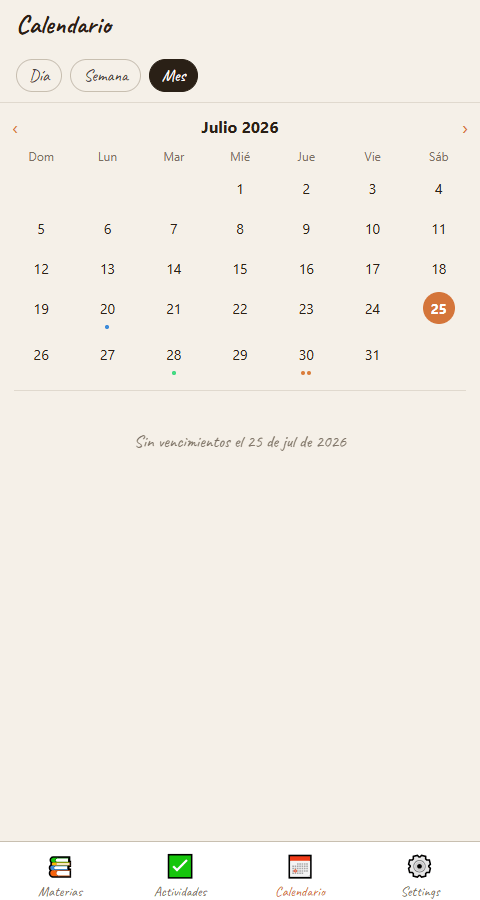
The Activities screen puts the previous section’s hierarchy to work: the Tasks / Activities / Projects subtabs are its three levels, and the course filter crosses them with the level above. Each task shows its course and activity, so the flat list retains the context provided by the tree.
A repository layer over storage that changes by platform
Data access is not scattered across components: there is a repository layer with interfaces under
src/repositories/. A generic interface defines the contract and each entity has its own, separated from
its concrete implementation:
src/repositories/
  IRepository.ts          ← generic: getAll / getById / create / update / delete
  ICourseRepository.ts    IActivityRepository.ts
  IProjectRepository.ts   ITaskRepository.ts
  courseRepository.ts     activityRepository.ts   ← implementations
  projectRepository.ts    taskRepository.ts
Beneath it is a single implementation, and this is the important detail: storage changes by platform.
src/storage/storageAdapter.ts selects by Platform.OS between expo-secure-store on iOS and Android
and localStorage on the web, so the same app runs on phone and browser without the rest of the code
knowing. That is what makes these screenshots possible.
What must be stated just as clearly: there is no real database. There is no SQLite or other engine behind it—it is state persistence (Zustand with its persistence middleware, backed by this adapter), not a data layer. It works for the app’s scope and claims nothing beyond it.
The rest follows the same split: app/—Expo Router routes, with the (tabs) group and dynamic [id].tsx
routes—stays thin, while logic lives in src/ across components/, stores/, repositories/, theme/,
hooks/, i18n/, and utils/.
13 days, no tests and no CI, with one visible pending item
There are no tests and no CI
There are zero test files in the repository and no GitHub Actions workflow: .github/ does not exist. I state it directly because it is true and because that is not what this case is about: what it demonstrates is the design→code process and the product that emerged, not a testing discipline this project never had. The whole app fit into 13 days; everything automated stayed out.
TODO.md still has one open item
One pending item remains written down: show projects with a dueDate in the calendar's week view. I leave it documented instead of deleting it, yet the project is still marked as finished: the MVP is closed and usable, and this detail blocks nothing the app does today.
There is an inherited inaccuracy worth correcting here: the GitHub repository description says “React
Navigation,” while the app actually uses Expo Router—React Navigation appears as a transitive dependency,
not as the API being programmed. There is also an initial docs/project.md that became outdated (it still
lists as “to be confirmed” things the code resolved 32 commits ago); I leave it as evidence of prior
planning, not as a source for the stack.
The project is finished in the most literal sense: 32 original commits, 13 days, and a complete app with its data hierarchy, calendar, search, two languages, and two themes. What I take away is the beginning: drawing all 26 screens before writing code is what made the 11 phases implementation rather than discovery.