My first app designed solely for mobile
mobile-calendar is an academic scheduling app: it manages subjects (Cursada, including schedule and
location), assignments and submissions with status, and loose notes, and displays them in four views—
Today, Day, Week, and Calendar. The problem I wanted to solve was my own: keeping classes and due dates in
one place, on my phone, without depending on somebody else’s app.
But the real reason this project exists—and the one that matters for everything that follows—is that it was the first app I tackled exclusively for mobile, on my own. Not a course exercise or a step-by-step tutorial: an end-to-end project of my own, built over 8 days. The first commit is from March 28, 2026, and the last from April 4.
Eight days is not much, and it shows in several parts of the repository. I include it anyway, because the interesting part of this case is not the finished product: it is what I learned here and where it led.
DDD over a domain that spoke my language
I could have built this with a couple of screens and one large useState. I chose the opposite: layered
architecture with Domain-Driven Design.
The domain stayed in Spanish because the concepts come from university life and translating them would
only add noise: Cursada, Trabajo, Nota, Horario, Persona, Ubicacion. The technical parts—folders,
interfaces, tests—are in English. Entities are classes, not plain objects, and several have their own Value
Objects validated in the constructor: Email, Telefono, Descripcion, Calificacion. The idea was
simple: if an object exists, it is valid. There is no Calificacion in an impossible state waiting for
somebody to review it later.
Telefono best shows the intent: instead of an invented regular expression, it uses libphonenumber-js
to validate real Argentine phone numbers. The business rule lives in the domain object, not scattered
across the screens that use it.
Above that are the layers: domain/ with entities, errors, and repository interfaces
(ICursadaRepository, ITrabajoRepository, INotaRepository); application/ with use cases
(CursadaUseCases, TrabajoUseCases, NotaUseCases); data/ with concrete repository implementations;
and presentation/ with screens, components, navigation—React Navigation v6, Stack plus Bottom Tabs—and a
theme.ts containing color tokens.
That is exactly the part I tested: there are 16 Vitest files, and they are not where decorative tests tend to be. Ten cover entities and value objects, three cover repositories, and three cover use cases. Zero UI tests. It was a conscious decision about where an 8-day project’s effort mattered: domain validation can break silently, while a misaligned screen is visible immediately.
How the design began: marker and whiteboard
Before writing the first screen, I drew the views by hand. They are committed in the repository under
resources/images/, and they are exactly that: photos of marker sketches on a whiteboard. They are not
screenshots of the running app.
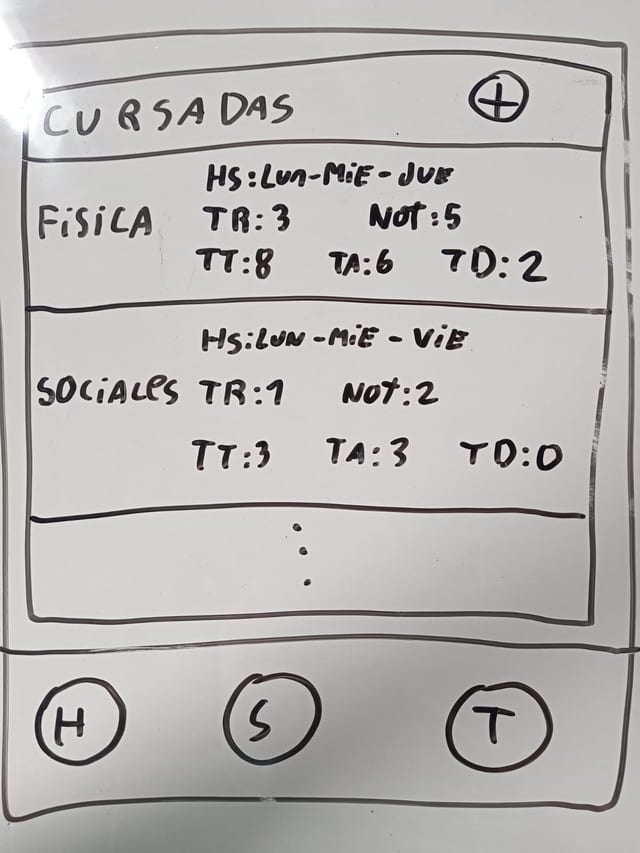
The Subjects sketch is the most settled: each subject is a card with class days at the top and, below, counters summarizing progress—assignments, grade, submissions.
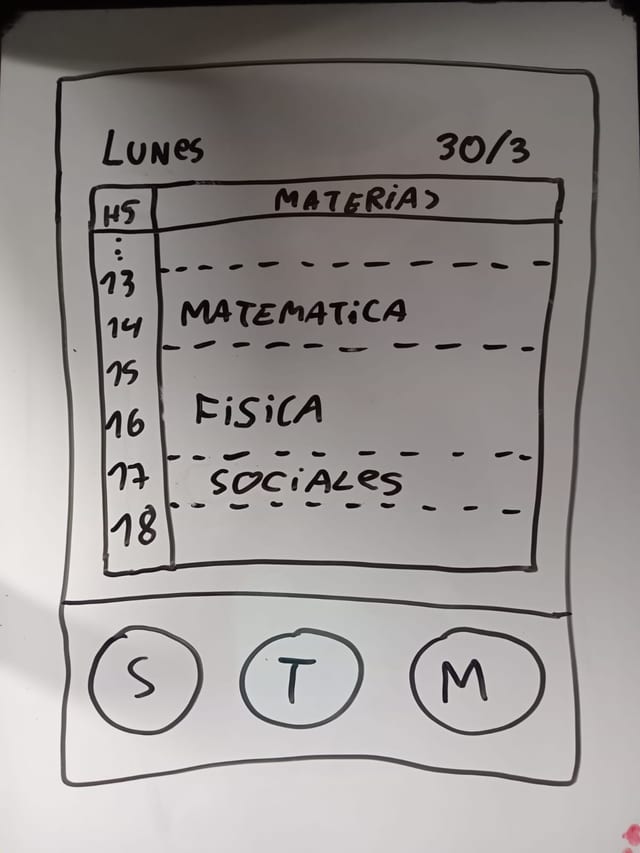
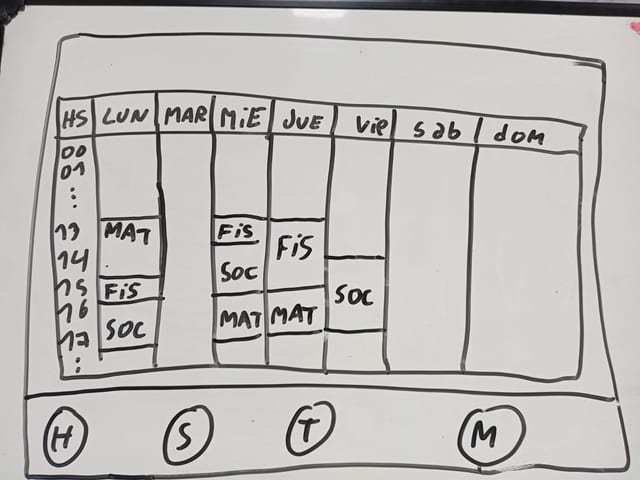
All three drawings share a decision that carried into the code: a fixed bottom tab bar as the sole way to move between views. The week is drawn in landscape with the whiteboard turned sideways, while Today and Subjects are portrait: a seven-day-by-hour grid needed a different orientation, and that was settled on paper instead of debated in the emulator.
I leave them here exactly as they are, hand and marker glare included, because they show the step that is normally invisible: the app did not begin in a code editor.
Three things I would do differently today
This repository has three holes, and none is a detail.
Persistence does not exist. The data layer is in memory: close the app and everything is lost. The README calls it a future improvement—“Future enhancement: Integrate AsyncStorage or SQLite for persistence”—but future it remained. The repository architecture was designed precisely so that adding real storage would mean swapping one implementation behind an interface, yet I still did not get to it. Preparing a place for a solution is not the same as solving it.
The history tells no story. There are 4 commits total, and most of the entire app—domain, layers,
screens, navigation—landed in one: feat: complete academic calendar app with DDD architecture. There is
no way to read the order in which anything was built or return to an intermediate point.
There is no CI. The 16 Vitest tests exist, but nothing runs them automatically: there is no
.github/workflows/. Whether they passed depended on me remembering to run them.
None of the three is a time excuse. They are the things you do not yet know you will miss on the first pass.
The first step in a journey that continues in another project
This project is archived, and I do not hide it. But archived is not the same as discarded:
mobile-calendar is the direct origin of my-school-app, which is why it
belongs in the portfolio.
The chronology says it without embellishment: mobile-calendar closed with its last commit on April 4,
2026, and 18 days later, on April 22, my-school-app began. The same problem—organizing coursework,
subjects, submissions, and the calendar—and the same base stack: Expo, React Native, TypeScript.
What changed is everything left halfway here. my-school-app has real, cross-platform persistence instead
of data that disappears when the app closes. It uses Expo Router and Zustand instead of classic React
Navigation and context. It has i18n. And its history is 32 commits broken into numbered phases, rather than
one giant commit: the exact weakness described above, corrected. Even the design process matured in the
same direction: whiteboard sketches became 26 HTML wireframes committed before programming began.
It is the same idea, two passes. The first served me for a while as a calendar and gradebook, and above all taught me what it lacked. Without this app—without using it and running into its three holes—the second would not have started where it did.